

Ask an AI about this page
 ChatGPT
 Claude
 Perplexity
 Google AI Mode
 Microsoft Copilot
 Grok
Grok Mistral Le Chat
Create and use portals
A portal keeps the money you collect for one shop, form or project separate from the rest, so it is easier to keep track. Each portal has its own Portal Key, which your website or plugin uses to send payments to it.
Create a portal
Section titled “Create a portal”Create a separate portal for each shop or project. To create one:
- In the merchant dashboard, choose Portals at the top of the page. Your portals are listed.
- Choose Add New Portal.
- Complete the form that opens and save it.
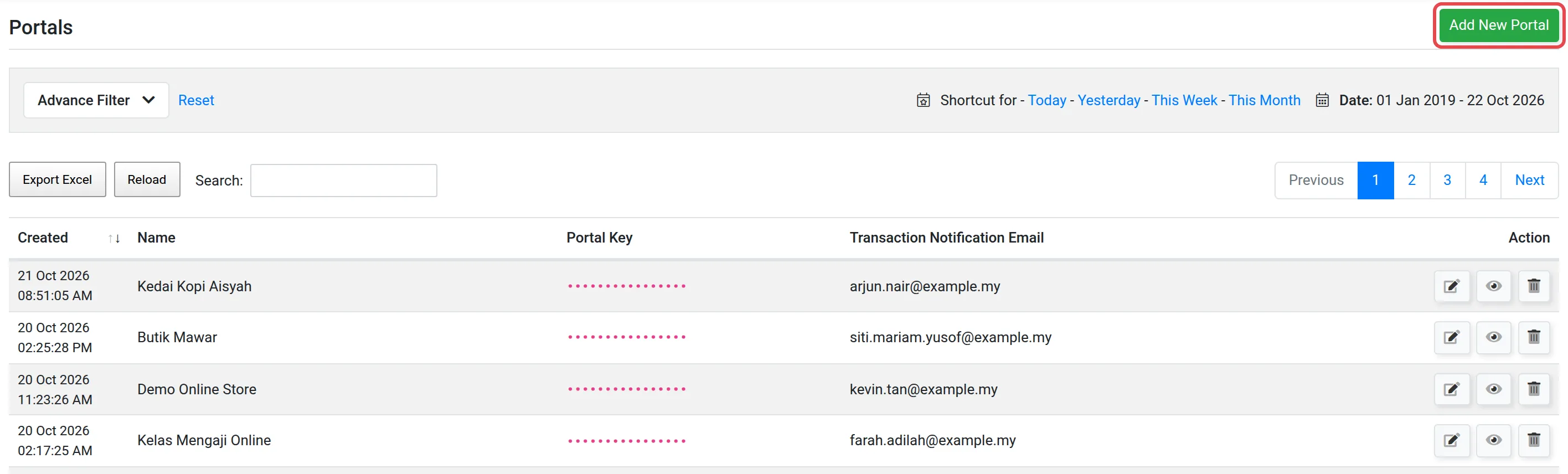
Then copy the new portal’s key from Portals. See Find your API keys.
Split a payment
Section titled “Split a payment”A split payment divides one payment between different accounts. When you create a portal, you can tick the split payment box. You can split between up to 3 accounts.
Simple habits make reports easier:
- Use one portal for each shop or project. Each portal then holds only its own payments, so they are easier to match to your records.
- See the payments of one portal. On Transactions, click Advance Filter, choose the portal in Portal, then click Filter. See See the transactions of one portal.
- Keep the Portal Key private. Anyone with your keys can use your account. See Find your API keys.
Common issues
How many accounts can a split payment go to?
Up to 3 accounts.
Where do I copy my Portal Key?
Choose Portals, select the portal, and copy its Portal Key. See Find your API keys.
Was this article helpful?
Thanks for your feedback.
Sorry this didn't help. WhatsApp us and we'll sort it out with you.