

Ask an AI about this page
 ChatGPT
 Claude
 Perplexity
 Google AI Mode
 Microsoft Copilot
 Grok
Grok Mistral Le Chat
Accept payments from abroad with cross-border channels
Cross-border channels let customers in Indonesia, Singapore and other countries pay from their own banking app or e-wallet. You switch them on per portal in the merchant dashboard. Then you show them on your form or checkout.
The cross-border channels
Section titled “The cross-border channels”Each channel has an ID that developers use as payment_channel in the API.
| ID | Channel | Customers from |
|---|---|---|
| 9 | DuitNow QR QRIS Indonesia Online Banking | Indonesia |
| 10 | DuitNow QR QRIS Indonesia e-Wallet | Indonesia |
| 11 | DuitNow QR NETS Singapore | Singapore |
| 13 | DuitNow QR Alipay | China |
| 14 | DuitNow QR WeChat Pay | China |
| 15 | DuitNow QR PromptPay | Thailand |
Switch the channels on for a portal
Section titled “Switch the channels on for a portal”Do this in the merchant dashboard when you create a portal for overseas payments.
- Sign in to the merchant dashboard and open Portals.
- Click Add New Portal.
- To use every channel, tick all of them.
- To serve only one country, tick only the DuitNow QR QRIS Indonesia channels or DuitNow QR NETS Singapore.
- Save the portal.
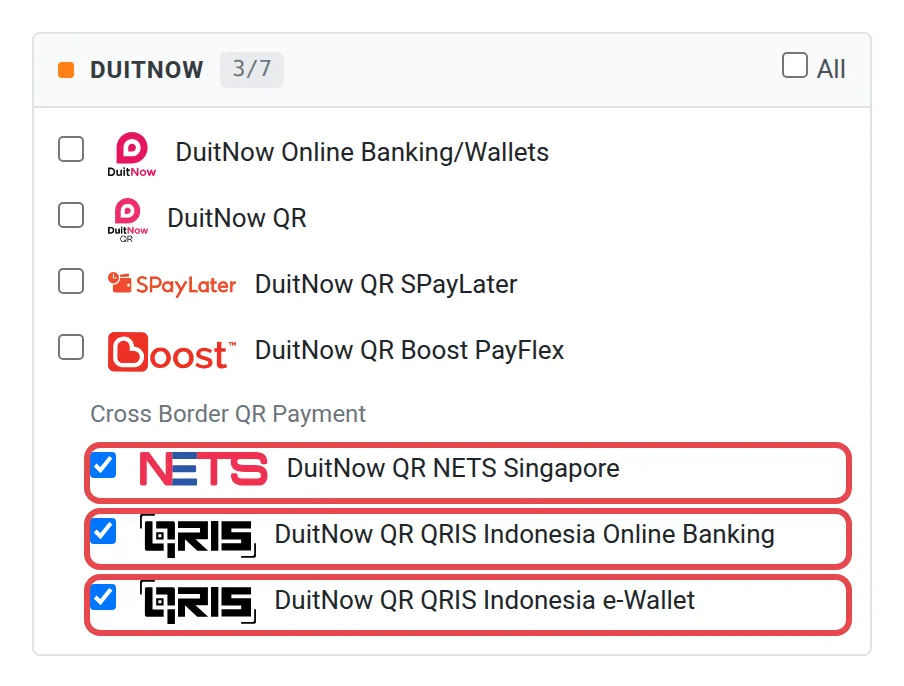
If a channel is not in the list, ask the Bayarcash team to switch it on for your account.
Show the channels where customers pay
Section titled “Show the channels where customers pay”Bayarcash switches the channel on. Your form or shop must then offer it.
- Connect the portal key of that portal to your form or shop. See Portals.
- In BCL (bcl.my), open the form’s payment options and add the channel, then update the form. The steps are in the BCL help centre: NETS for Singapore customers.
- For plugins and the API, pick the channel in the plugin, or send its ID as
payment_channel. See the API reference.
Payments then show under Transactions. See Transactions.
Banks and e-wallets that work with QRIS (Indonesia)
Section titled “Banks and e-wallets that work with QRIS (Indonesia)”Customers in Indonesia pay with QRIS, the national QR code standard of Indonesia. These banks and e-wallets support QRIS payments to Malaysia. The list is from August 2024. Other QRIS apps can also work.
| Banks | E-wallets |
|---|---|
| PT Bank Central Asia | ShopeePay |
| PT Bank CIMB Niaga | GoPay |
| PT Bank Mandiri (Persero) | Dana |
| PT Bank Negara Indonesia (Persero) | LinkAja |
| PT Bank Permata | OVO |
| PT Bank Rakyat Indonesia (Persero) | |
| PT Bank BTPN |
This is what an Indonesian customer sees in a banking app, in this example Livin’ by Mandiri:
- They scan your DuitNow QR code. The app shows your shop name, the amount in MYR and their source of funds. They tap Next.
- On Transaction Confirmation, they check the rate from MYR to IDR and the amount in rupiah. They tap Continue Payment.
- The app shows Payment Successful!.
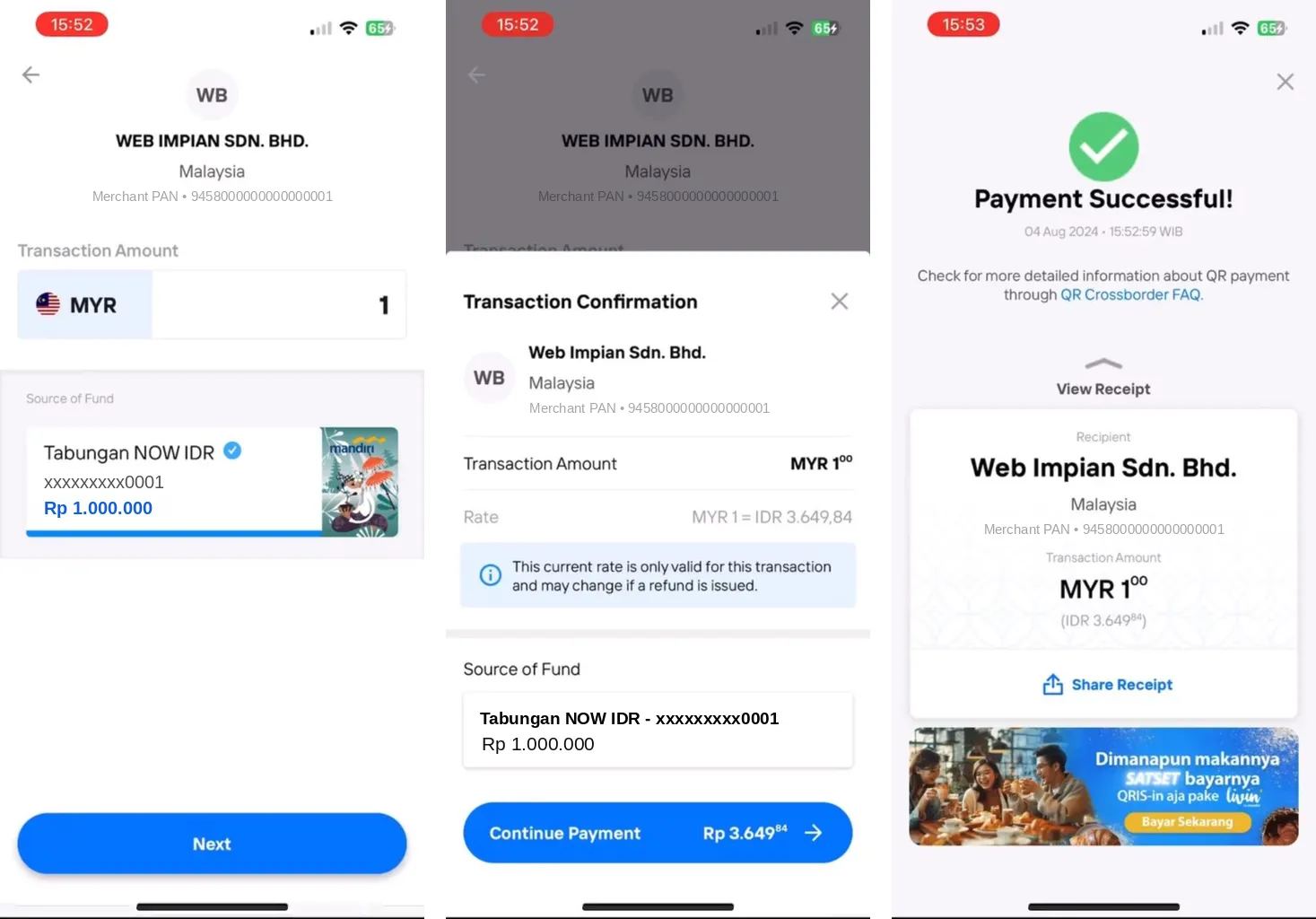
The account number, balance and merchant number in the picture are samples.
Pay from Singapore with DBS PayLah!
Section titled “Pay from Singapore with DBS PayLah!”Customers in Singapore can pay you with DBS PayLah!, the payment app of DBS Bank, through DuitNow QR.
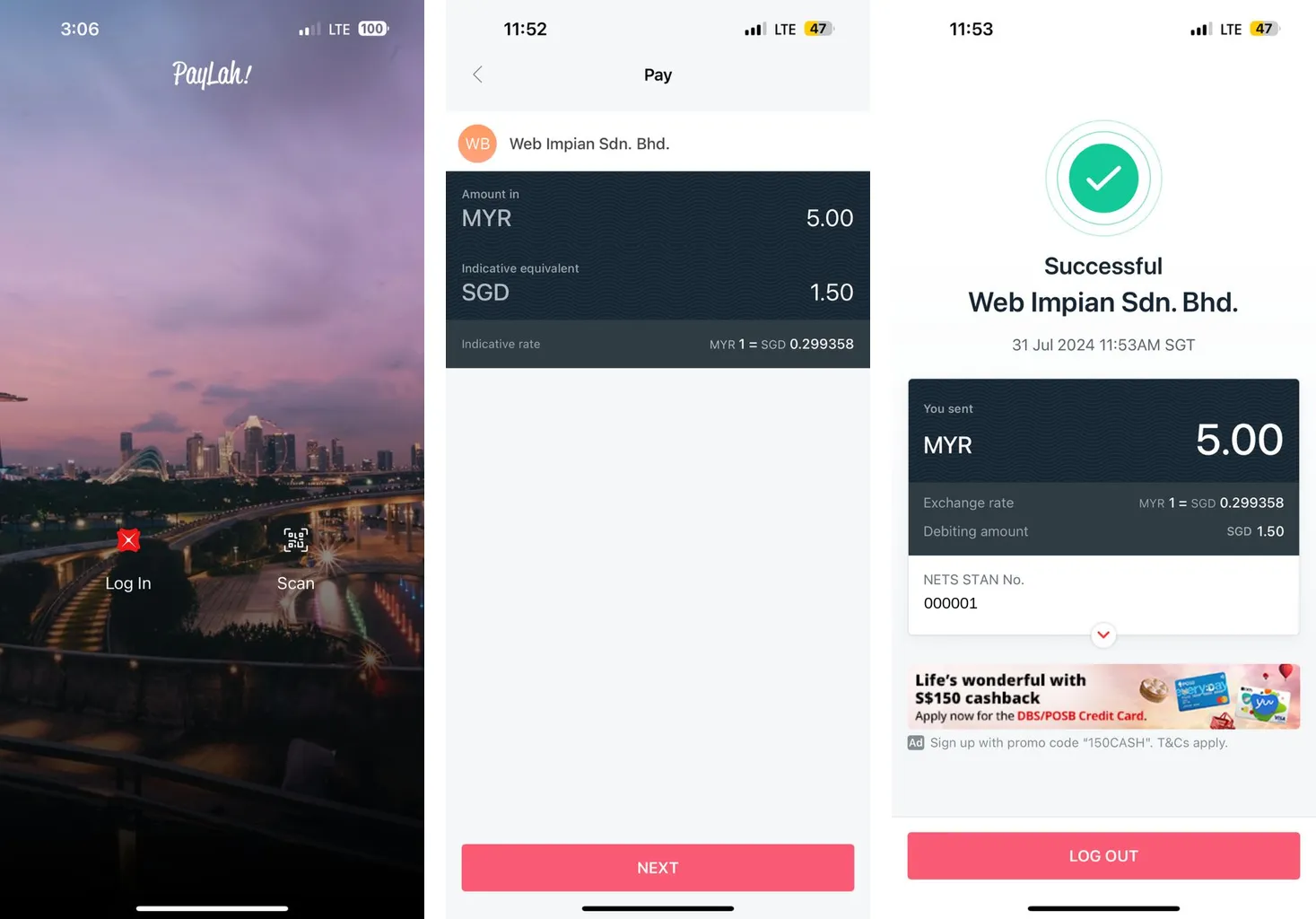
- In DBS PayLah!, the customer taps Scan and scans your DuitNow QR code.
- On Pay, they check your shop name, the amount in MYR and the same amount in SGD. They tap NEXT.
- The app shows Successful. It also shows the exchange rate and the amount in SGD that DBS takes from their account.
Common issues
The QRIS or NETS option is not in my form or checkout. What should I check?
The channel must be switched on for the portal your shop or form uses. Open the portal in the merchant dashboard, or ask the Bayarcash team, then refresh the portal list where you use it.
Do I need a separate portal for Singapore or Indonesia?
No. You can tick all channels on one portal, or only QRIS Indonesia or NETS Singapore if you serve one country.
Was this article helpful?
Thanks for your feedback.
Sorry this didn't help. WhatsApp us and we'll sort it out with you.