

Ask an AI about this page
 ChatGPT
 Claude
 Perplexity
 Google AI Mode
 Microsoft Copilot
 Grok
Grok Mistral Le Chat
Why did my payment fail?
A payment can fail because of the customer’s bank, their account, or the way the order was sent. The merchant dashboard shows the reason FPX or the bank gave, so you can tell which it is and what to do.
See why a payment failed
Section titled “See why a payment failed”Do this in the merchant dashboard.
- Open Transactions.
- Find the payment and click the eye icon (View transaction details).
- Read the status message. It is the response from FPX (PayNet) or the bank.
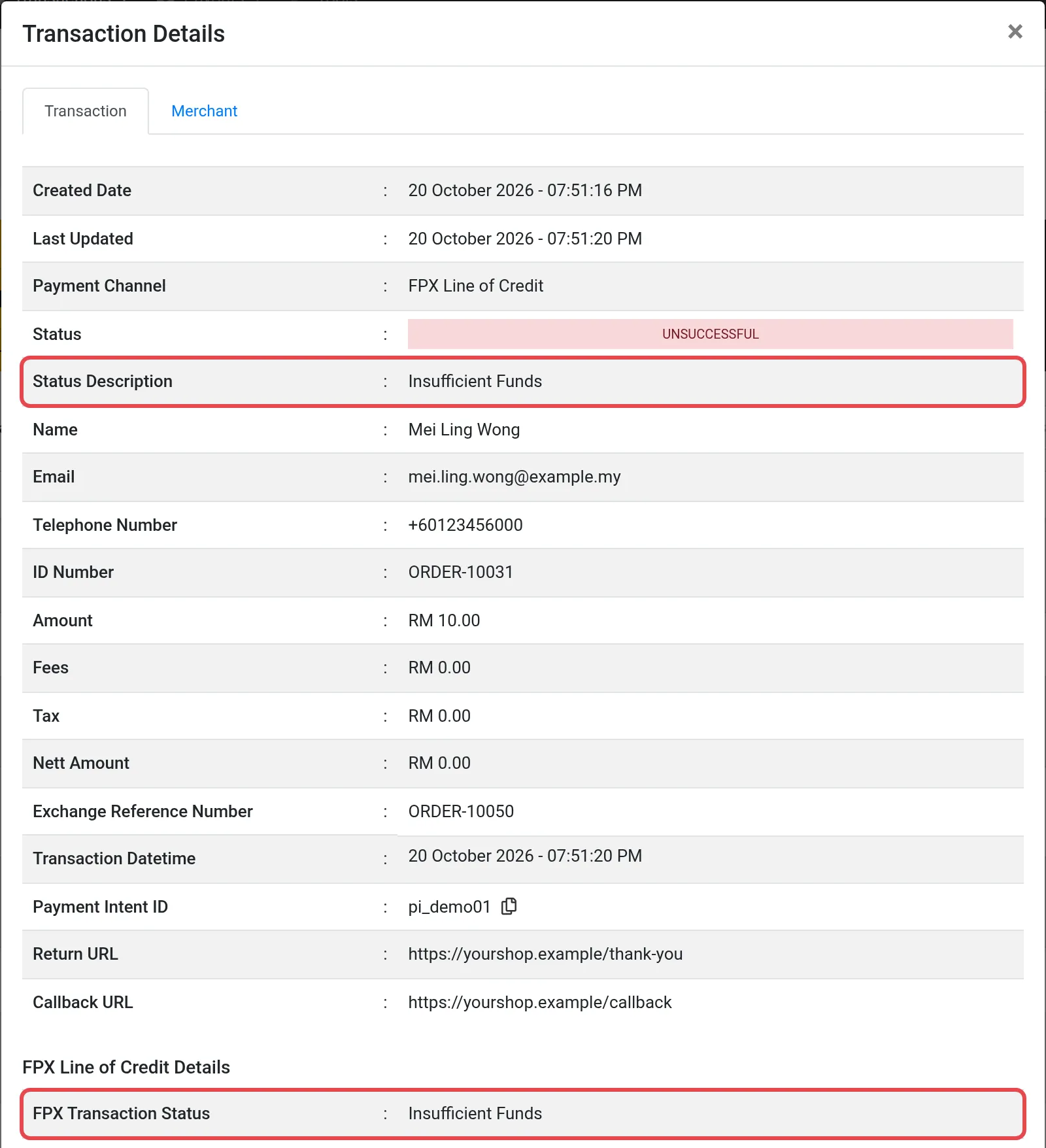
The message comes from FPX or the bank. Bayarcash only receives it and shows it to you. For example, if it says Bank Declined Transaction, the customer’s bank refused it.
Transaction statuses
Section titled “Transaction statuses”Failed payments usually show one of these statuses.
| Status | Code | What to do |
|---|---|---|
| Unsuccessful | 2 | Read the message in the details, then find it in the tables below. |
| Cancelled | 4 | The customer cancelled. Ask if they want to try again. |
| Abandoned | 5 | The customer left before finishing. Send them the payment link again. |
See Transactions for the full list.
Causes and fixes
Section titled “Causes and fixes”The tables list all 76 FPX response codes from PayNet, the company that runs FPX. Find the message from the transaction details, then do what its group says.
Approved
Section titled “Approved”The payment went through. Nothing to fix. If your shop still shows the order as unpaid, see Callbacks and checksum.
| Code | Message |
|---|---|
| 00 | Approved |
Pending
Section titled “Pending”The result is not final yet. Do not ship the order and do not ask the customer to pay again. Check the transaction again later. For code 99, the second approver at the customer’s company must approve the payment in their business banking.
| Code | Message |
|---|---|
| 09 | Transaction Pending |
| 99 | Pending Authorization (Applicable for B2B model) |
The customer cancelled or took too long
Section titled “The customer cancelled or took too long”The customer stopped the payment, or the bank session ended. Ask the customer to try again.
| Code | Message |
|---|---|
| 80 | Buyer Cancel Transaction |
| BC | Transaction Cancelled By Customer |
| OF | Transaction Timeout |
| 1M | Internet Banking Session Timeout |
| 1A | Buyer Session Timeout At Internet Banking Login Page |
| 1B | Buyer Failed To Provide The Necessary Info To Login To Internet Banking Login Page |
| 1C | Buyer Choose Cancel At Login Page |
| 1D | Buyer Session Timeout At Account Selection Page |
| 1E | Buyer Failed To Provide The Necessary Info At Account Selection Page |
| 1F | Buyer Choose Cancel At Account Selection Page |
| 1G | Buyer Session Timeout At TAC Request Page |
| 1H | Buyer Failed To Provide The Necessary Info At TAC Request Page |
| 1I | Buyer Choose Cancel At TAC Request Page |
| 1J | Buyer Session Timeout At Confirmation Page |
| 1K | Buyer Failed To Provide The Necessary Info At Confirmation Page |
| 1L | Buyer Choose Cancel At Confirmation Page |
The customer’s account or limit
Section titled “The customer’s account or limit”The customer’s account cannot make this payment. The customer can use another account, raise the limit with their bank, or pay with another channel.
| Code | Message |
|---|---|
| 51 | Insufficient Funds |
| 48 | Maximum Transaction Limit Exceeded |
| 2A | Transaction Amount Is Lower Than Minimum Limit |
| 14 | Invalid Buyer Account |
| 39 | No Credit Account |
| 53 | No Buyer Account Number |
| 77 | Invalid Buyer Name Or Buyer ID |
| 57 | Transaction Not Permitted |
The bank was not available
Section titled “The bank was not available”The problem is at the customer’s bank or at FPX. Wait, then try again, or use another bank. To see if a bank is down, check Bank Status.
| Code | Message |
|---|---|
| 31 | Invalid Bank |
| 92 | Invalid Buyer Bank |
| BB | Blocked Bank |
| 79 | Host Decline When Down |
| 85 | Internal Error At Bank System |
| 90 | Bank Internet Banking Unavailable |
| OE | Transaction Rejected As Not In FPX Operating Hours |
| 87 | Debit Failed Exception Handling |
| 88 | Credit Failed Exception Handling |
| 89 | Transaction Not Received Exception Handling |
The order details
Section titled “The order details”The order that your shop sent was not accepted. Send a new, unique order number for each payment attempt, in MYR, and check the amount.
| Code | Message |
|---|---|
| 45 | Duplicate Seller Order Number |
| XO | Duplicate Exchange Order Number |
| XN | Transaction Rejected Due To Duplicate Seller Exchange Order Number |
| 13 | Invalid Amount |
| 47 | Invalid Currency |
| 2X | Transaction Is Canceled By Merchant |
The merchant set-up
Section titled “The merchant set-up”A setting for your account at FPX does not match. Contact the Bayarcash team.
| Code | Message |
|---|---|
| 03 | Invalid Merchant |
| 05 | Invalid Seller Or Acquiring Bank Code |
| SB | Invalid Acquiring Bank Code |
| 46 | Invalid Seller Exchange Or Seller |
| 49 | Merchant Specific Limit Exceeded |
| 50 | Invalid Seller for Merchant Specific Limit |
| 58 | Transaction To Merchant Not Permitted |
| XA | Invalid Source IP Address (Applicable for B2B2 model) |
| XB | Invalid Seller Exchange IP |
| XI | Invalid Seller Exchange |
| XS | Seller Does Not Belong To Exchange |
A technical problem
Section titled “A technical problem”A message between the systems failed. Try again. If it happens again, send the order number and the time to the Bayarcash team.
| Code | Message |
|---|---|
| 12 | Invalid Transaction |
| 20 | Invalid Response |
| 30 | Format Error |
| 70 | Invalid Serial Number |
| 76 | Transaction Not Found |
| 78 | Decryption Failed |
| 83 | Invalid Transaction Model |
| 84 | Invalid Transaction Type |
| 96 | System Malfunction |
| 98 | MAC Error |
| FE | Internal Error |
| XE | Invalid Message |
| XF | Invalid Number Of Orders |
| XM | Invalid FPX Transaction Model |
| XT | Invalid Transaction Type |
| XW | Seller Exchange Date Difference Exceeded |
Direct Debit e-Mandate details
Section titled “Direct Debit e-Mandate details”These codes are for a Direct Debit enrolment. Check the e-Mandate details, such as the email, the frequency and the bank, then send the enrolment again. See Direct Debit e-Mandates.
| Code | Message |
|---|---|
| DA | Invalid Application Type |
| DB | Invalid Email Format |
| DC | Invalid Maximum Frequency |
| DD | Invalid Frequency Mode |
| DE | Invalid Expiry Date |
| DF | Invalid e-Mandate Buyer Bank ID |
The messages are as PayNet writes them. PayNet’s own list has no text for 11 codes (03, 14, 39, 47, 49, 87, BB, OF, XB, XI and 1A). For these codes, the text comes from other FPX providers, and these providers all give the same text.
Reduce failed payments
Section titled “Reduce failed payments”- Offer more than one channel. If one bank is down or refuses, the customer can pay another way. See Payment channels.
- Use a unique order number every time.
- Keep the amount in MYR and within your channel’s limits.
Common issues
The merchant dashboard says Bank Declined Transaction. Is this a Bayarcash problem?
No. The message comes from FPX or the customer's bank. Bayarcash shows it for your reference. Ask the customer to check with their bank or try another way to pay.
The customer says money left their account but the payment shows Unsuccessful.
Open the transaction details and note the status message, the order number and the time. Send these to the Bayarcash team so they can check it with the bank.
I get Duplicate Seller Order Number. What does it mean?
The same order number was used before. Send a new, unique order number for every payment attempt.
Was this article helpful?
Thanks for your feedback.
Sorry this didn't help. WhatsApp us and we'll sort it out with you.