

Ask an AI about this page
 ChatGPT
 Claude
 Perplexity
 Google AI Mode
 Microsoft Copilot
 Grok
Grok Mistral Le Chat
Check your payout bank account
Bayarcash sends your payouts to one bank account. The Payout Bank page shows that account. Check it before your first payout, and after any change to your business bank.
See your payout bank account
Section titled “See your payout bank account”You can see the account, but you cannot change it here.
- Sign in to the merchant dashboard.
- In the top menu, choose Profile.
- Choose Payout Bank.
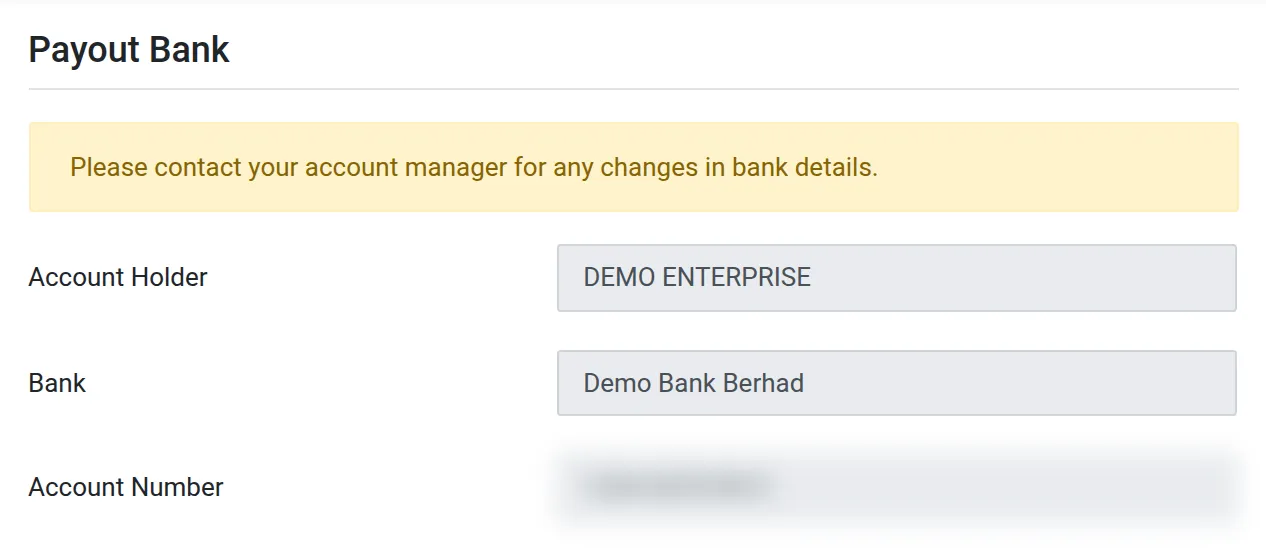
The page shows these fields:
| Field | What it shows |
|---|---|
| Account Holder | The name on the bank account |
| Bank | The bank that receives your payouts |
| Account Number | The account number that receives your payouts |
Change your payout bank account
Section titled “Change your payout bank account”The page says: “Please contact your account manager for any changes in bank details.” Speak to your account manager before you close the old account. If the account is wrong, a payout can fail or go to the wrong place.
To follow your payouts, see Payouts to your bank account.
Common issues
How do I change the bank account for my payouts?
You cannot change it in the merchant dashboard. Contact your account manager. The Payout Bank page also says this.
My payout went to an old account. What do I do?
Open Profile → Payout Bank and check the account. If it is wrong, contact your account manager immediately.
Was this article helpful?
Thanks for your feedback.
Sorry this didn't help. WhatsApp us and we'll sort it out with you.